HMRC Fraud
There has been talk on the radio this morning and in the papers about various phishing attacks purporting to be tax refunds from HRMC.
Note that HMRC do not do refunds by e-mail, so any e-mails you get from them about refunds are fake and are designed to empty your bank account, after you have given them your bank details.
Here’s one I got earlier.
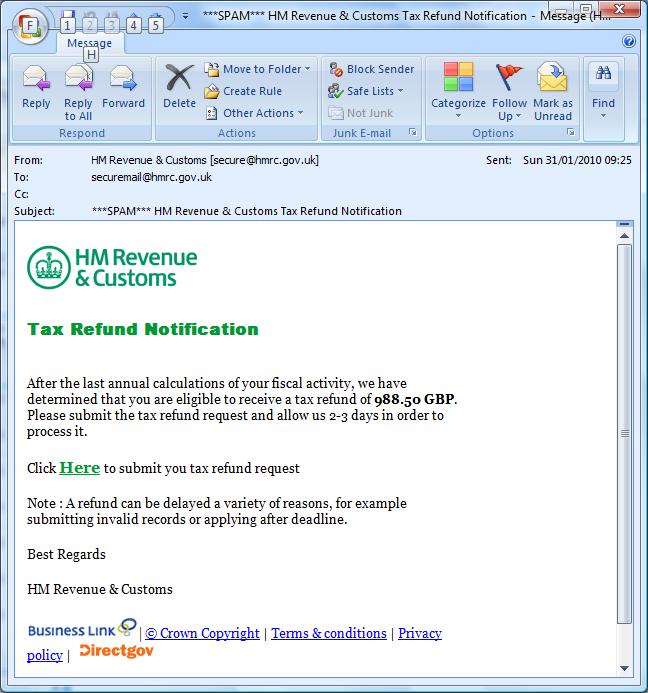
HMRC Spam E-Mail
These points should be noted.
- It is obviously spam, not least because my ISP has actually marked it as possible spam in the header.
- Bear in mind the fact too, that my accountant does my tax return and I think that HMRC don’t know my e-mail address.
- It is a good idea to learn how to read the Message Headers using your e-mail program. I use Outlook and this page in About.com tells you how to do it. In the headers for this e-mail, you can see there are lots of .br’s, which mean that at some point the e-mail has visited Brazil. Not the quickest route to Suffolk from the HMRC.
- They do show that the e-mail came to my standard e-mail address. Which means it wasn’t a genuine e-mail, as I use a special e-mail address for all financial transactions. Always use a different e-mail address for normal communications and financial transactions.
- The To: address in the e-mail is securemail@hmrc.gov.uk. Nearly all companies send important e-mails to the e-mail address you have given them.
- The value of the refund is shown as 988.50 GBP. I’m always suspicious of this, as the £ sign needed to show the value properly is not available on non-UK keyboards. About half of my genuine on line purchases use the £ sign and others use GBP. But phishing attacks nearly always use GBP.
- Click Here to submit you tax refund request. Note you instead of your. I know the HMRC can be stupid at times, but they don’t make spelling mistakes like this, as if they did, they would be a laughing stock in the tabloids.
- There are other grammatical errors and I don’t think the HMRC would use Best Regards.
You should always read these spam e-mails. That way, you will understand more and more what they look like and you won’t get caught out.
Reporting instructions for these sort of e-mails are on the HMRC web site.
No comments yet.
 The Anonymous Widower
Leave a comment