Trying the iPad
I went into PC-World at Tottenham Hale to try an iPad. The reason is that I need a simple to use computer to take with me on my travels. Currently, I use a Samsung Netbook, but the keyboard isn’t the best for my hands.
So what do I need to do on the move.
- Browse the Internet.
- Send and receive e-mails.
- Update this blog.
- Buy travel tickets.
- I might want to write a few applications.
- I would also want it o be able to run my software Daisy, as I feel the two concepts are made for each other.
The iPad seems to fit a lot of these criteria and I was also able to use the touch screen keyboard easily. The last bit surprised me.
But the trouble with the iPad is that it’s an Apple product and is more about style rather than substance. I also feel strongly that the device needs to be Windows-based so that I can run Daisy. That may seem a bit of a small need, but just wait until I find a suitable Windows-based one and install Daisy!
Thanks though to Kevin in PC-World, who showed me professionally what the device can do!
How to Replace a Key On a Laptop
I am a computer professional of long standing or should that be sitting. But my expertise is software and not hardware!
On the other hand, my friend, Pula, has had little computer training, other than on how to use Windows and the various applications. But she comes from a family that prefers to face up to challenges rather than duck them!
So when the B key on her laptop became sticky, she attempted to fix-it. Getting the key out was the easy part, but putting it back was a but tricky.
So Pula struck and searched the Internet for some help and found this web site, where there was a page for her computer.
Well done Pula! If she can do it without any experience, surely you can try!
HP 77870 or Similar
I have a similar one to these 9 track tape drive in the cellar. It was bought for a job for a major bank, but they welched on the deal, so I ended up with a piece of hardware I didn’t want. At £14,000 too! And that was in 1995.
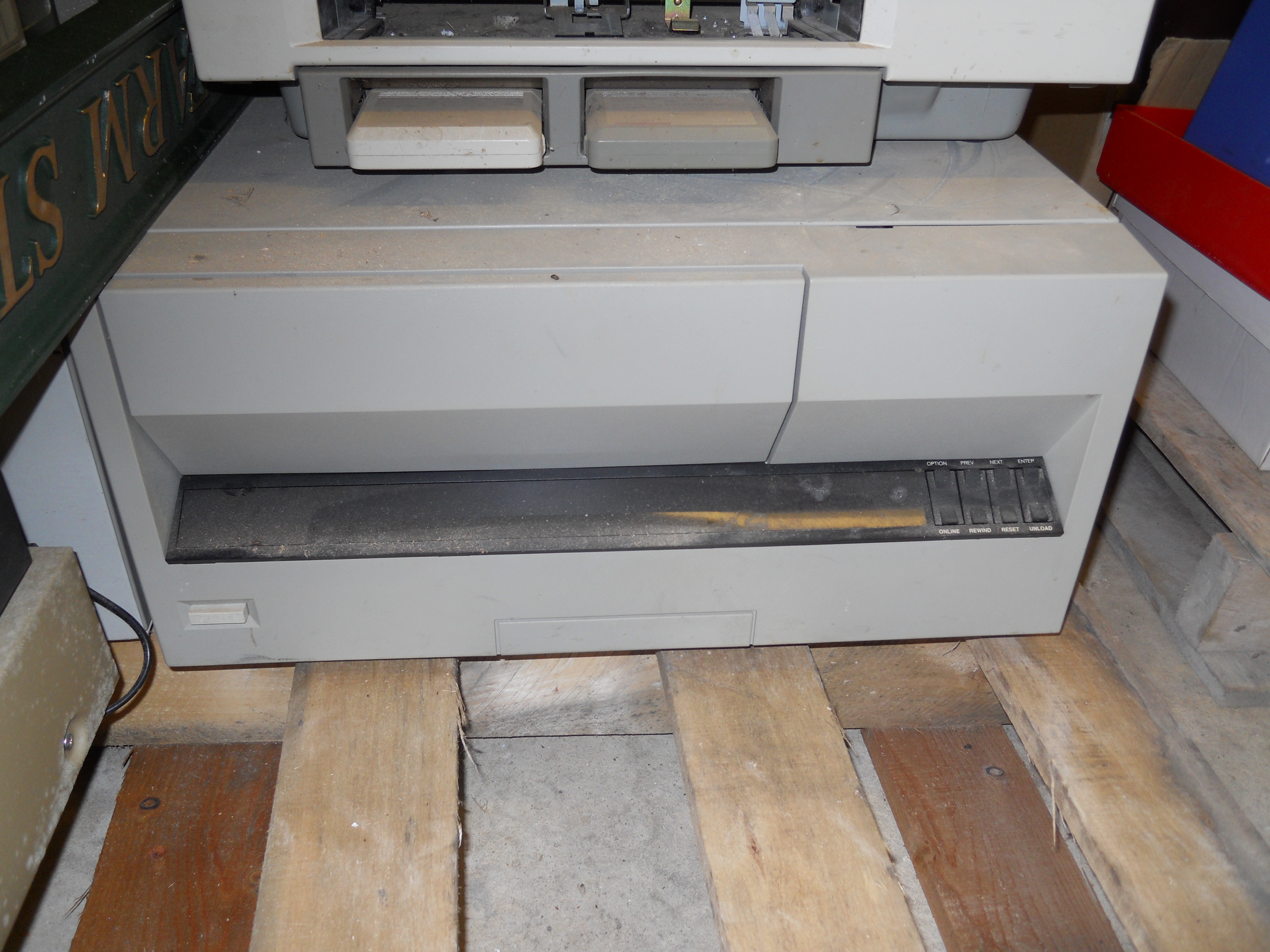
HP 77870 or Similar
So it’s sat there just annoying me for 15 years. It has about 10 hours on the clock and of course some dust, but it is fully enclosed.
If anybody wants one contact me. I also have the SCSI Interface somewhere, but I suspect it would be best as a plug-in replacement for one that has failed.
Note in the picture there’s a LaserJet IID parked on top of the tape drive.
How to Keep Your Computer Running Smoothly
This post really has been brought about because many of my friends seem to struggle keeping their computers working smoothly. And it doesn’t seem to matter whether they are Macs or Windows PCs.
Children and Young Adults
A lot of the problems I have found seem to stem from allowing teenage and sometimes older children to use the machine, as they gum it up with massive video and music files and inappropriate software. This would not normally be a problem, but many older people are careful with their computers and often run one that is a bit older and therefor short of both disc space and memory.
So the answer should be no, when your child asks if they can update their iPod.
Not Enough Memory
I also find that a lot of PCs don’t have enough memory, so make sure that you have at least two gigabytes. To find out how much you have go to the Control Panel and display the System. This should tell you. It is usually a simple matter to purchase more memory from someone like Crucial over the Internet. Installation is not difficult on many machines, but if you can’t do it yourself, there are plenty of your friends who can do it.
Slow Starting Up
Slow start-up of a computer is often caused by loading too many programs at the beginning. Many software companies think that their products are so important that they preload every time you start the machine. But do you really want them loaded every time. This page says how you remove them for Windows XP. For Vista it is quite similar except that you’ll need to find the Run command, which is in Accessories.
Updating Windows and Programs
I also always update my computer to the latest versions of Windows. Some people set the settings to do this, but set it for the middle of the night and then it either doesn’t get done or makes your computer extremely slow in the morning. If your computer always seems to have a hangover when you start it up, move the update download to a more convenient time.
Backing Up
And then there is the need to backup everything regularly. I backup all my important documents and my e-mails to an external hard disc at least once a week. Good external hard discs, usually cost about £50 and just plug in to your USB ports.
You can also back-up to SD cards, like you get in digital cameras. This is to be recommended for important documents and pictures, that say go with a particular project you have worked on. Can you be sure that DVDs will still be readable in twenty years? I suspect they will, but I reckon SD cards are a better bet. You can get very affordable and good ones from Memory Bits.
Cleanliness
A last point and one that is often forgotten. Keep your computer clean!
 The Anonymous Widower