Have I Put In Enough Sockets?
We live in an age, where every device we have has a different charger and everything else needs to be connected to the mains.
My phone, broadband and Sky television lines all come in at one end of my living room, whereas the ideal place for the television is at the other end on a bracket that allows the television to either face the room or be visible from the kitchen.

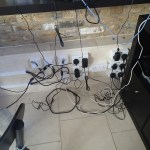
So I decided to put upwards of a dozen plugs at each end of the room and run three HDMI cables along the wall, so that I could feed the signals to the television. I also ran aerial and Ethernet cables along the wall. Note the two plastic trunkings.
Until now, I’ve just used long HDMI cables, which because they have to go into the back of the Sky and BT boxes, they go round the bend a few times and make everything difficult.
The new layout, has also allowed me to move my laptop, so that when I use it, I face directly at the television, which is much more comfortable.
What is it with me and Networking?
I always find it totally impossible to set up a computer network. This one is no exception. I have put the Netgear AV 200 Powerline device in a socket and connected it to the router, just like it says in the picture with the documentation.
I’ve installed software on my computer and can it find the device. Of course it can’t! But it was early yesterday, as I was able to print a test page. It can find the device if I put the cable in my computer rather than the modem.
So my hoodoo with hardware strikes again.
I can’t get on-line support as the serial number on the device is too small for me to read. And I can’t find one of my two magnifying glasses.
Computer Networking
I have had some very bad experiences trying to network computers. Today though I used a pair of Netgear Powerline AV200 adapters to connect my laptop computer upstairs to one of my printers downstairs. They seem to allow me to print without any changes to the settings on my laptop at all.
This is very much a first for me, as normally linking a printer to a computer remotely takes me a couple of days. Either networking is getting better or I’m learning how to do it better. I’d put it down to the networking.
All I need to do now is get my main computer attached to the Internet. Here’s hoping!
Ideas – Control Through a Computer Network
I have a pretty extensive computer network in my house and the buildings. It’s all very standard stuff based on Cat5e cabling and a few switches.
I have a couple of cameras on the network to watch over the horses and these work well. Effectively they are cameras with an inbuilt web server that takes an address on the network. You type in that address and you see the pictures.
But there do not appear to be many other devices, that work in a similar way.
For instance, I would like a switch that could sit on the network and be used to switch exterior lights on and off at night. Or more likely when I think there is something suspicious happening. I would just click a small window on the computer screen.
There are other devices I would like to put on my network; speakers, weather sensors and level gauges for my gas tank.
I can’t find anything on the Internet, that you just plug in and start playing.
Go on! Make my day build one. I think you’ll sell lots!
Network Frustrations
Whoever thought up how computer networks work, should be taken outside and shot. And many of the people who put them together deserve a worse fate.
My network here has a large aerial, so that anybody who wants to can connect with the right key. That’s the theory, but sometimes you can connect and sometimes you can’t. There is no logic to it.
Grr!
And try finding someone, who wants to come and fix it. I have a large budget to get it right and people come and say yes, but that’s the last I hear of them.
 The Anonymous Widower