What the Internet Has Become
I don’t use Yahoo much except as a host for the various groups that I moderate.
However this morning, I looked at their search engine as a friend had got problems with Google.
This is their top ten searches :-
- East Enders
- Heather Mills
- Champions League
- Britney Spears
- Rihanna
- Natalie Imburglia
- Ronnie Wood
- Amy Winehouse
- Coldplay
- Katie Price
So the economy, global warming and unemployment are all fixed then!
Electronic Plagiarism and Copyright Infringement
I’m getting a lot of this lately. What happens is that articles on this blog, get copied and put into other peoples’ web sites without attribution or a link. Wikipedia explains the difference between plagiarism and copyright infringement as.
Plagiarism is not copyright infringement. While both terms may apply to a particular act, they are different transgressions. Copyright infringement is a violation of the rights of a copyright holder, when material protected by copyright is used without consent. On the other hand, plagiarism is concerned with the unearned increment to the plagiarizing author’s reputation that is achieved through false claims of authorship.
But whatever it is I don’t like it and some of my readers have been moved to comment on my post on Cornflour. Why that one was copied, I haven’t a clue?
So how can we stop it, mitigate the effect of the copying or even benefit from it?
In the first place, if your post is good English, (or French, Spanish, Mandarin or anything else for that matter), with lots of recognisable phrases, you will be a bit more likely find them. I suspect that if I type “Electronic Plagiarism and Copyright Infringement” into Google in a few weeks, I’ll find a few copies of this article.
I have started putting a link into each post that links to the rest of my blog. The reason is that they generally don’t remove the links, so if any reader finds it interesting, they might link back to the rest of your site.
But whatever you do, don’t complain to the perpetrators. They’ll only wind you up and do it more often.
As I said in one of my comments, there are much more important things in life, than trying to stop this minor irritation.
Just Like Old Times
Years ago, when I was writing Artemis, I was always to be found at the computer from about five in the morning or even earlier. My late wife would be snug in bed.
But then when I wake up I get up. And guess what, it’s now just before five and after waking up from a strange dream, I am now at the computer.
Am as I as productive as I was in the 1970s?
Probably not, but I still have the stamina to program for twelve hours a day. On the other hand, there are a lot more algorithms in my mind now, so I don’t have to spend time finding them!
Ideas – Control Through a Computer Network
I have a pretty extensive computer network in my house and the buildings. It’s all very standard stuff based on Cat5e cabling and a few switches.
I have a couple of cameras on the network to watch over the horses and these work well. Effectively they are cameras with an inbuilt web server that takes an address on the network. You type in that address and you see the pictures.
But there do not appear to be many other devices, that work in a similar way.
For instance, I would like a switch that could sit on the network and be used to switch exterior lights on and off at night. Or more likely when I think there is something suspicious happening. I would just click a small window on the computer screen.
There are other devices I would like to put on my network; speakers, weather sensors and level gauges for my gas tank.
I can’t find anything on the Internet, that you just plug in and start playing.
Go on! Make my day build one. I think you’ll sell lots!
Illegal Uploading
The government makes a lot of fuss about the illegal downloading of films, television programs and music. But I suspect more of us are affected by illegal uploading, or the various spam messages we get all the time.
Here’s one I got this morning.
From:Lady Sylvia Ströher
23-16 street, Berlin,Germany.
I am Lady Sylvia Ströher suffering from cancerous ailment.
I am married to Lord Stroher,a German shipping tycoon notable for his great wealth,influential extended family,and charitable activities all his life before his death.Our life together as man and wife lasted for three decades without child.My husband died after a protracted illness in August 22,2007.My husband and I made a vow to uplift the down-trodden and the less-privileged individuals as he had passion for persons who can not help themselves due to physical disability or financial predicament.I can adduce this to the fact that he needed a Child from this relationship,which never came.
When my late husband was alive he deposited the sum of 20.000.000.00 (Twenty Million Great Britain Pounds Sterling) which were derived from his vast estates and investment in capital market with his bank in United Kingdom and named me as the beneficiary of this trust fund.
Presently,this money is still with the Bank.
Recently, my Doctor told me that I have limited days to live due to the cancerous problems I am suffering from.Though what bothers me most is the stroke that I have in addition to the cancer.
With this hard reality that has befallen my family,and me I have decided to donate this fund to you and want you to use this gift which comes from my husbands effort to fund the upkeep of widows, widowers,orphans,destitute, the down- trodden, physically challenged children,barren-women and persons who prove to be genuinely handicapped financially.
It is often said that blessed is the hand that giveth. I took this decision because Ido not have any child that will inherit this money and my husband relatives are bourgeois and very wealthy persons and I do not want my husband’s hard earned money to be misused or invested into ill perceived ventures.I do not want a situation where this money will be used in a worldly manner, hence the reason for taking this bold decision.I am not afraid of death hence I know where I am going.I do not need any telephone communication in this regard due to my deteriorating health and because of the presence of my husbands relatives around me as i am currently bed ridden in the Family house here in 23-16 street, Berlin,Germany.
and do not receive any visitors unless approved by Huwer Stroher who is the immediate younger brother to my late husband.I do not want them to know about this development in order to safeguard this bequest.I will also authorise my Private Attorney in the UK whom i communicate with via emails all the time,to issue a Letter of Authority that will empower you as the new beneficiary of this fund, he would also endorse my WILL where i will name you as the beneficiary of the 20.000.000.Million GBP.You can contact my personal Lawyer through his email address only on this email below please:
Barrister Jones Shealy
Email: shealyjon@gmail.com
Tell him that I have WILLED the said sum to you and the reason for doing this is best known to me.My happiness is that I lived a life worthy of emulation. Please always be kindhearted all through your life.Please assure me that you will act just as I have stated herein.
Your’s Sincerely
Lady Sylvia Ströher
We all know that it’s a scam and you shouldn’t reply to it. But some people must do as these people wouldn’t keep sending the junk.
But what are the authorities doing about it. At best little and most probably nothing.
But as a programmer, who likes to think he knows the Internet better than his hand, there must be simple solution.
For instance, the technology is such that if we all forwarded this junk to a special e-mail address, then the various e-mails could be analysed and if say a hundred copies were found, then any e-mail addresses used would be immediately shut down. A lot of this could be automated and if done on a world-wide basis, it would make it much more difficult for these swindlers to operate.
Or we could use a guerrilla approach.
You register an anonymous e-mail address at something like Hotmail, GMail or Yahoo and then send the embedded e-mail addresses in the fraud a nice large picture file of say a puppy, kitten or something else pleasant as an attachment. If enough of us did that, then these fraudsters would quickly get overloaded and hopefully the innocent wouldn’t get sucked in. They would obviously target your anonymous address, but when it gets unusable, you just abandon it.
After all these anonymous e-mail address companies, are one of the reasons we get so much junk. If they did a few more checks when an account was opened, the fraudsters perhaps would be deterred.
Silk Icons
There is a lot of good free stuff on the Internet. I’ve just upgraded MX73 with the Silk Icons from a guy in Birmingham. West Midlands not Alabama!
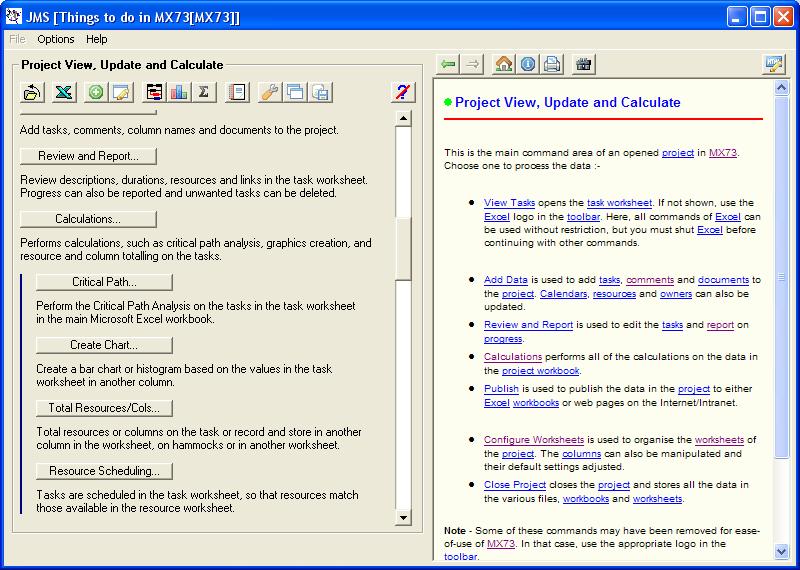
MX73 with the Silk Icons
At least the software is coming on fast. It’s one of the advantages about living alone. There is no-one to tell you when you are working too hard!
The Australian Diamond Dealer
This is a tale that I am pretty sure is true. But on the other hand it might just be one of those tales that passes down from teller to teller gathering more and more embellishments as time goes on.
In the 1970s, I used to work as a consultant to a clearing bank. I’m not going to say which, but it probably can be ascertained by those who know me. In that case, you’re wrong, as either it’s another bank or the tale was about another.
On the computing side banks went through a lot of changes at that time. Remember that D-day when we went from £sd to £p was the 15th February 1971 and also computers were starting to replace manual systems. So there was a large scope for mistakes and possible fraud.
This Australian, who claimed he was a diamond dealer turned up at a Central London branch, saying that he’d like to open an account. He had a reference from an Australian bank and backed it with a substantial cash deposit. He said that he was spending a few months in “the old country” and when he returned, he would take all the money out of his account in cash to purchase diamonds to take back.
It all sounded feasible and over the months, nothing raised any suspicion in the bank. Money came into the account and just as quickly came out in cash to buy diamonds. But never at any time did the account go into the red.
Then, the Australian announced that he was going back to Oz and on a particular day he would draw the money out of his account in cash and close it. He left a forwarding account for any charges or extra payments that might accrue.
It was only noticed later that the date he would leave was a few days after the branch was computersied. And someone went in and changed the paying-in slips in the branch for ones where the account number had helpfully already been filled in.
You’ve guessed it, but it was the Australian’s account.
I heard this tale twice and let’s say that a very nice six figure sum disappeared.
In one version, he wasn’t even Australian!
Technology That Works
The postman came about five minutes ago.
He delivered two pieces of post that mattered amongst all the old junk; a new card for Sky and a Voter Registration Form from St. Edmundsbury.
The card had been flagged up on my Sky system for about a week now. A simple message just told me that the card had been posted and could I check the post. I took out the old card and entered the new one. It worked first time. As it should.
The Voter Registration Card had only one problem. The URL was rather complicated, especially as it included St. Edmundsbury, which is not the easiest word to type. But after a couple of pages and a few clicks, I’d updated everything. Or in my case, just told them that a very lonely man, who spends a lot of his time blogging is still alive!
Seriously though, life isn’t that bad all the time.
But both systems worked without a hitch and with the exception of the URL couldn’t be faulted.
An aside here, is that if you’re developing an on-line system, make sure that the URL is short. There are lots of six and seven character ones available. I even recently acquired mx73.com. Short and memorable.
I just wonder how less stressful our lives would be if so many of the other things that we have to do in our lives were just as simple. We’re getting there, but not as fast I would like.
One thing that works round here, is that when my wife died, the Registrar informed the council, so that I got an automatic Council Tax discount, after I signed and dated the form they sent me. A very civilised piece of joined up thinking.
Do all councils work this way?
And then we have the excellent system for Vehicle Excise Duty, that has cost the Post Offices so much money, as who in their right mind queues for an hour to buy it.
Network Frustrations
Whoever thought up how computer networks work, should be taken outside and shot. And many of the people who put them together deserve a worse fate.
My network here has a large aerial, so that anybody who wants to can connect with the right key. That’s the theory, but sometimes you can connect and sometimes you can’t. There is no logic to it.
Grr!
And try finding someone, who wants to come and fix it. I have a large budget to get it right and people come and say yes, but that’s the last I hear of them.
Metier Minotaur
I started a company called Metier Management Systems. For my birthday, an old friend gave me a copy of the rather interesting magazine called the Metier Minotaur.
I shall be printing copies, so if anybody wants a facimile let me know.

