Does Anybody Type Using Five Fingers Of One Hand, Scanning Them Where Necesary For Shift, Control And Alt.

Note.
- My left awas broken by the school bully and doesn’t work well.
- My stroke didn’t help.
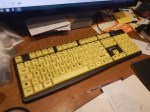
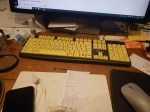
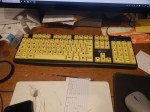
- I have a yellow keyboard and I’m probably typing as fast as I ever had.
- My father owned and worked in a letterpress printers.
- He taught me to set type from an early age.
Letterpress typesetting is done by holding the composing stick in your left hand and placing the letters in order in the stick, with your right hand.
I now type this way and it may be the cause of the problems in my right hand, which is red and tingling at times.
I asked Google AI, the title of this post and received this answer.
Yes, many people type using all five fingers of one hand, particularly individuals with limb differences, injuries, or those who prefer a single-handed method. This technique often involves “scanning” or spanning across the keyboard and can achieve impressive speeds.
Techniques and Methods
FGHJ Home Row Method: The most common approach involves resting the index finger on F (or J for right handers), middle on G/H, ring on H/G, and pinky on J/F. This allows the hand to cover all keys on a standard QWERTY keyboard.
“Scanning” / Stretching: The hand moves dynamically around the keyboard, rather than staying in a fixed home-row position, relying on strong muscle memory to reach all keys.
Modifier Key Handling (Shift/Alt/Ctrl): The thumb is frequently used to reach modifiers, or the pinky is stretched to reach the shift keys. For simultaneous keys (e.g., Ctrl+C), people often use “Sticky Keys” in Windows/MacOS to lock the modifier key, or press them sequentially.
Five Finger Typist: There is specialized, structured software designed specifically to teach this five-finger, one-handed technique.
Speed and Proficiency
One-handed typists using all five fingers can reach high speeds, often ranging between 40 to 80 words per minute (wpm), with some experienced users achieving over 100 wpm, depending on the individual.
Assistive Tools
Compact Keyboards: Smaller keyboards (like laptop keyboards) are often used because they reduce the distance the hand has to span, decreasing fatigue.
Half-QWERTY / Mirrored Layouts: Specialized software or hardware that allows one hand to “mirror” the other side of the keyboard (e.g., tapping ‘F’ with the ‘J’ finger while holding a modifier).
Conclusion
I could believe that answer and will use it as long as I can!
I’ve Got A New Keyboard
My eyesight is not as good as it was, so I have called in the experts.
The RNIB recommended this keyboard with large yellow keys.
At a price of just over thirty pounds it seems to make a lot of difference to my typing.
It was bought from the RNIB web site.
To install it, I just shut down the computer, swapped the keyboards and restarted the computer.
These are some thoughts on the use of these keyboards.
Typing Accuracy
I’ve been using the keyboard for about three hours now and I’ve only made one mistake.
Last week, I was typing garbage all the time.
Should Every Office Have A Keyboard Like This?
I have four minor eyesight and keyboard problems, so I am probably a special case.
- My first eye-test was done by a retired eye doctor of many years experience, who said, I’d got the driest eyes he’d ever seen.
- Because of the dryness, I have a bath every day and put my head under the hot water for perhaps five minutes every morning, when I get up.
- The school bully broke my left humerus, so I usually type with just my right hand and look down on the keyboard.
- My mother went blind from macular degeneration, so I’m worried about the same happening to me.
The keyboard certainly seems to improve my typing.
From what I’ve learned in the last few hours, at least the knowledge of these keyboards and where to get them should be in every office.
Customer Data Entry
I have solar panels on my roof and I have to enter how much electricity, I’ve generated every few months.
Although, I have problems reading the meter, I have no problems entering the values into the Internet.
But I can envisage some data entry, where one of these keyboards would help, when the customer in reporting their readings or energy usage.
Perhaps someone should devise a large screen smart meter for solar panels? I certainly need one!
Medical And Other Research
I am involved in medical research as a lab-rat.
In two cases, I have been asked to use a computer.
- At Moorfields Eye Hospital they were testing a new instrument that had been designed by one of the London Universities, to test a particular ocular function, that used a keyboard worked by the patient.
- At the University of East London, I used a computer to test my balance as part of stroke research.
Using a yellow keyboard might remove bias in the research, against bad typists.
High Pressure Typing Jobs
How many people have to retire from high pressure jobs with a lot of typing, because there eyes aren’t up to it?
Could the thirty pounds for one of these keyboards allow people to work productively longer?
The keyboard my help someone to return to work earlier after an eye operation.
Coeliacs like me are prone to cataracts and I’m pretty certain, that the keyboard would have helped my recovery.
Public Keyboards
I haven’t come across more that one or two public keyboards in say a GP’s surgery or an optician’s, where the patient has been asked to use a computer for a test.
But I do believe this type of testing will happen more often.
Using a yellow keyboard might remove bias in the test , against bad typists.
Digital Disparities Among Healthcare Workers
This paper in the BMJ is entitled Digital Disparities Among Healthcare Workers In Typing Speed Between Generations, Genders, And Medical Specialties:Cross Sectional Study.
Surely, the title suggests a problem. But does that problem exist in similar or different patterns across other professions?
More Research needs to be done.
Conclusion
With a small amount of innovation, the blind and those with failing eyesight should be able to use computers and smart devices as easily as sighted people.
Logging In In France
On my recent trip to Bilbao and back, I spent three days in France and on the two mornings in Biarritz, I checked some of my Internet accounts, from a computer in the hotel’s Business Centre.
My major accounts have a system of logins and passwords that are stored in my Mark One brain, which means it is a system that is unbreakable without my being present. Nothing is written down, on or in anything I carry.
However, France with its bizarre keyboard layout, made some of the logins difficult. For instance to login to many accounts, you need to type an e-mail address, but that is not easy, as typing the @ sign is not a simple shift, but a control-alt keystroke.
Sometimes, France can get very annoying in the simplest of things, by going its own sweet way.
Typing With One Hand
I’ve now acquired a new Sony VAIO laptop with a wide 17.3 inch screen. I mainly bought it, as my old HP machine is getting rather tired and I was fimding I made the odd mistakes on the keyboard. As the keys were more widely spaced on the Sony, I thought this might improve my typing and a brief test showed that it appeared to be better.
I’ve now got the new Sony and this video shows me typing.
Not how I span with my right hand to work the shift and control keys.
It is my left arm and hand that is bad, as I said here. But the computer would probably work equally well with someone, who had right hand problems.
Right-Handed Typing
I’ve now decided, that even if the mangled nerves in my left arm, aren’t the cause of my problems, holding up my left arm for typing irritates the hand and makes everything worse.
So I’ve now started using just my right hand for typing. I just rest my left arm and hand in my lap.
Years ago, there was a picture taken of me, in a recumbent position with the monitor more-or-less between my feet, which were on the desk and the keyboard in my lap. So I’ve always had problems about getting a convenient position for typing.
I’ve looked for one-handed keyboards on the web and there is nothing like I want. Although, one site says a laptop keyboard is best for one-handed typing and that is what I use anyway.
One thing that may affect my typing is that I’ve done any awful lot of setting of letterpress type. This is a right-handed operation, where the stick is held in the left and the letters are picked and placed by the right. I’m not sure, if I ever did any typsetting after my arm was broken, but if I did, it could explain how easy I find this method of typing.
After all, the last four or five posts have been done this way!
Rail Ticket Machines
The on-line rail ticket system is good, in that you can pick up your tickets from any machine you want, anywhere in the UK. They do ask you to nominate a specfic one, but I generally use the ones in Kings Cross, as they are convenient for me and are often not very busy, as there are lots of them. They are also slightly more private than some I could name.
The biggest problem is that you need to type in a randomly generated transaction number. I usually text it to my mobile phone, so that when I look at the Inbox, all I see is the numbers of tickets I need to collect, so I can hold the phone in my left hand, whilst I type with my right.
The system could be improved, by allowing you to type in a collection code, when you buy your ticket on-line. So for East Coast, you might use EC and the last four digits of your phone number. As to get the tickets, you’d need to put in the right credit card, that would probably be as secure as the current system. In fact it could be more so, as I’ve seen people take little bits of paper out of their wallet and then read the code, whilst they type it. Some machines have a Qwerty keyboard, which can be difficult for those who don’t type too well.
It would of course mean that collecting multiple tickets, as I’m doing all the time at the moment would be very easy, as I’d use the same code.
So I would end up with a pile of little orange cards, that I’d have to check before I left the station. But that happems now. It’s just that I have to type in several numbers instead of one.
I would also like to see the fact that the ticket had been collected acknowledged to me in an e-mail. That way mistakes and fraud would be spotted earlier.
And why not have a few chairs by the machines so that some like me could sit down and sort everything out.
My Arm is Giving Me Some Trouble
mMy left humerus was broken by a bully at school and for the last few days, it has been giving me quite a bit of trouble. Or that’s what I hope it is. My left hand was terrible yesterday and I had difficulty tying up my shoe laces. I also couldn’t get the souvlaki off the skewer. But after a good night’s sleep it seems to be a bit better. I’m actually using the shift key with my forefinger easily this morning. Usually I make a few mistakes and have to correct them. But today it seems alright. It could also be better because the Caps Lock key on this computer isn’t so easily mis-hit. Who needs the key anyway? I never normally use it.
I suspect that as I haven’t had any physio on the upper arm and shoulder for nearly two weeks now, that this is the problem.
No Response on the Keyboard Driver
I still have need for the keyboard driver, but I’ve got absolutely nowhere about finding someone to write it.
On the other hand my hand is better and I make a lot less mistakes.
Messages That I Like
One of the members of the UK-Coeliac Yahoo Group has told me that my typing seems to be getting better.
I like that! Thanks!
A Clean Internet Cafe
I’ve used Internet cafes all over the world from Morocco to Istanbul and from Naples to the Gambia.
There are certain characteristics that they all share; cigarette and other smoke, filth, surly operators and crap machines. Except possibly the one in Marrakech, which was kept spotless by a headscarfed and hennaed young lady of impeccable manners, who found it uncanny that my web site had pictures of me on it.
But this one, the Keystone Cafe, just up from King’s Cross Station has none of those nasty characteristics. The machine is a bog-standard Dell and even my typing isn’t that bad. Saying that I just hit the dreaded Windows key and got into a mess.
 The Anonymous Widower